Wize University Introduction to Finance Textbook > Time Value of Money
Introduction to TVM
Popular Courses
COMM 308
Concordia University
Intro to Finance
University Study Guides
FINA 200
Concordia University
Intro to Finance
University Study Guides
FINA 230
Concordia University
MGCR 341
McGill University
FIN 301
University of Alberta
FIN 300
Toronto Metropolitan University
COMM 121
Queen's University
FIN*2000
University of Guelph
FINC 341
Texas A&M University
COMMERCE 2FA3
McMaster University
COMM 2202
Dalhousie University
BU283
Wilfrid Laurier University
FIN 300
Arizona State University - Tempe
BUSFIN 3220
Ohio State University
SB/FINE 2000 3.00
York University
FIN 301
Pennsylvania State University
BUS-F 255
Indiana University - Bloomington
FIN 3403
University of Central Florida

0:00 / 0:00
What is Time Value of Money?
- The relationship between money, time and interest rates.
- Interest rates cause the value of money to change over time.
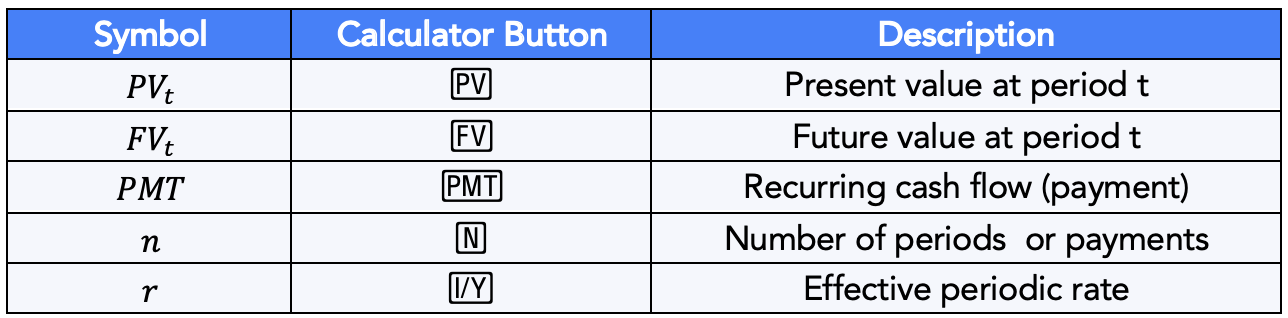
Real Life Applications of TVM
- Loans and mortgages
- Savings
- Credit cards
- Stocks and bonds
- Car leases
The Financial Calculator
Most TVM operations can be performed on a financial calculator, replacing the need to use some complicated formulae.

Please use the Texas Instrument BA-II Plus Calculator as it is the most widely used calculator and contains the most easy to use features.
Setting Up Your Calculator
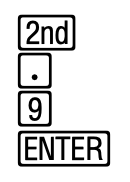
Step 1: Set the decimal places to 9
Step 2: Restore default setting for P/Y and C/Y
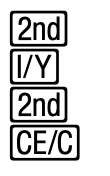
When doing this you should see P/Y = 1 and if you press the up or down arrow you should also see C/Y = 1.
Entering the TVM Variables
- First enter the value
- Then press the variable you wish to assign it to.
- For example: To enter the present value as $1,000:
- Step 1: Enter 1,000
- Step 2: Press the [PV] button
Wize Tip
On the financial calculator, always enter rates in percentage format. For example, if you wish to enter a rate of 5.1%, simply enter 5.1.
Computing a TVM Variable
- First enter the TVM variables you have
- Then press [CPT] followed by the TVM variable you wish to compute.
- For example: To compute the future value:
- Step 1: Enter the TVM variables you have
- Step 2: Press the [CPT] button followed by the [FV] button.